Find the words inside your everyday recordings

MP3 to Text Converter

Make podcasts, interviews, voice notes, and recorded calls searchable with an editable audio transcript.

Best accuracyProcess with the highest available accuracy
Free transcriptions today3 of 3 remaining

3 free transcriptionsNo sign-up requiredNo credit card required

Secure uploadPrivate processingExport as TXT, DOCX, PDF, SRT, or VTT
Editable TranscriptPrecise TimestampsSpeaker Labels3 Free DailyAutomatic Language DetectionPrivate ProcessingFlexible Exports

Five steps from recording to reusable writing

How to Convert MP3 to Text Online

1

Upload the MP3 recording

Choose the podcast episode, interview, voice note, or authorized call saved on your device. MP3 to Text accepts the audio directly; making a video wrapper adds no useful speech information.

Drop audio or video here

or browse your files
2

Set the language and speakers

Keep automatic language detection or choose the language you hear. Enable speaker recognition for a host and guest. MP3 to Text works best when the settings reflect the conversation rather than the filename.

Audio languageEnglish
Transcription qualityBest accuracy
Start Transcription
3

Generate the spoken draft

Start MP3 to Text to turn the recording into timestamped passages. A compressed file can still contain clear speech, although compression cannot restore words lost to a distant microphone or background music.

Creating transcript72%

Speech is becoming time-aligned text.

4

Listen and correct details

Review the MP3 to Text draft against playback. Check guest names, quoted figures, brand spellings, and changes of speaker before using passages in an article or sending notes to a colleague.

00:00:05Speaker 1
00:00:12Speaker 2
00:00:19Speaker 1
Synced playback
5

Download your approved version

Export MP3 to Text as TXT, DOCX, PDF, SRT, VTT, CSV, or JSON. Save corrections first so the written handoff and any later subtitle download reflect the same decisions.

Export as TXT
Export as DOCX
Export as PDF
Export as SRT
Export as VTT

Review the source before sharing the words

Search a Podcast or Interview Transcript

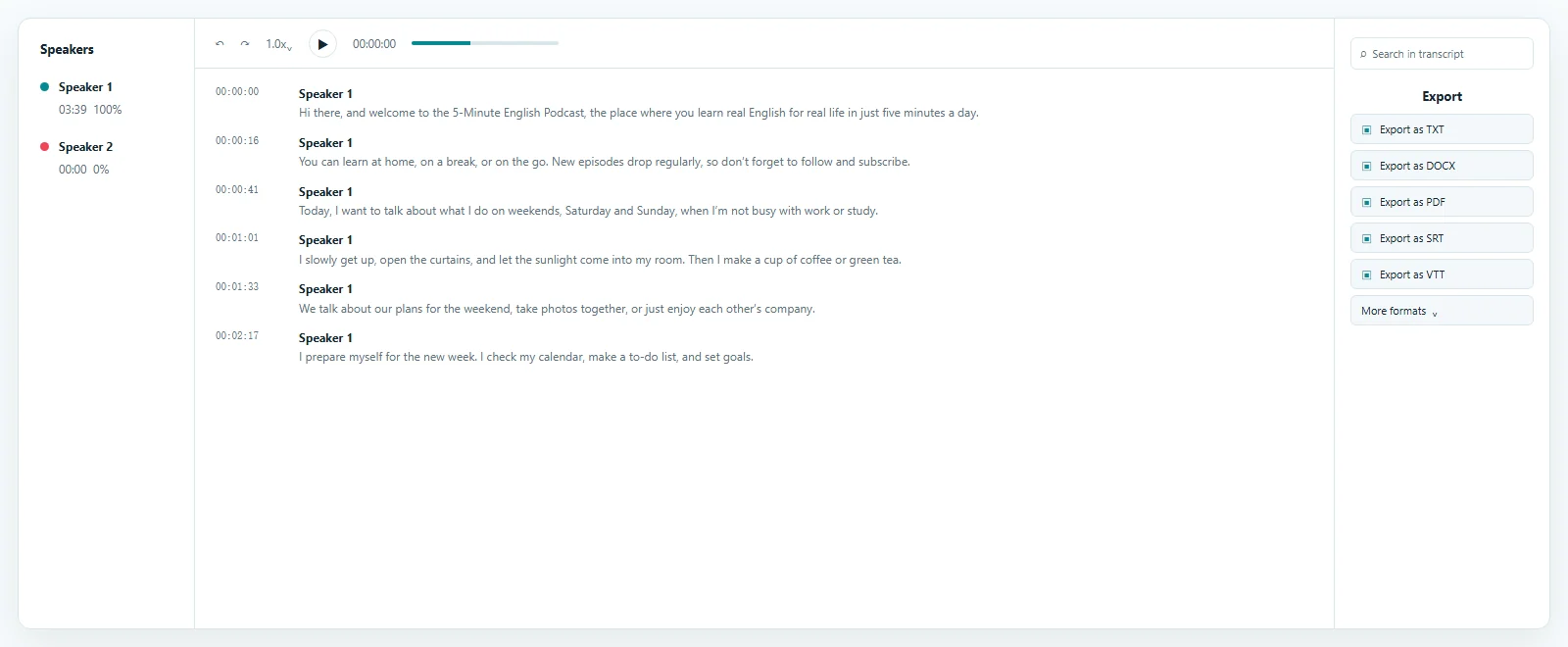
MP3 to Text gives a long listening session a readable index. Look for a guest name, recurring theme, or promised follow-up, then play the matching segment to check its meaning. The draft stays editable so producers can correct episode terminology before preparing show notes or sharing quotations with an editor.

Transcript result example

From an episode to useful source material

MP3 to Text for Podcast Production

An episode may contain several stories that deserve separate notes. MP3 to Text helps a producer locate the introduction, guest background, main discussion, and closing recommendations without repeatedly listening from the beginning.

Use the transcript as evidence for episode descriptions and editorial briefs. Keep quotations in context, verify unfamiliar names with the recording, and distinguish a direct quotation from a summary written for readers. MP3 to Text provides a draft, while the editorial judgment remains yours.

Short recordings deserve a clear destination

Voice Notes, Interviews, and Calls

MP3 to Text can turn a spoken reminder into a task description, a field interview into research notes, or an authorized call into a record of next steps. Review dates and commitments carefully before treating the written version as an agreed decision.

For interviews with several voices, use MP3 to Text speaker labels as starting points. Rename them after listening, and check interruptions separately. A quiet response can belong to a different person even when the automatic draft joins it to the previous turn.

Work with the source you already have

Review Compressed Audio with Care

MP3 to Text recognizes speech rather than the musical content of a file. A higher bitrate alone does not guarantee a better transcript: microphone position, competing sound, accent, and overlapping voices also matter.

If the original interview is available, upload that copy rather than a recording played through another speaker. Repeated conversions can remove useful detail. MP3 to Text keeps review close to playback so you can resolve uncertain passages before publication.

One reviewed draft, several practical outputs

Reuse Your MP3 to Text Result

Choose TXT for lightweight notes, DOCX for editing with a colleague, or PDF for a reading copy. MP3 to Text also offers SRT and VTT for compatible timed-text workflows, plus CSV and JSON for structured reuse.

Pick the destination after reviewing the words. Subtitle cues need timing checks, research quotations need source verification, and a meeting record needs correct names and responsibilities. MP3 to Text lets these outputs begin from the same saved transcript.

Answers before you upload

MP3 to Text FAQ

Is MP3 to Text free?

Yes. You can process up to 3 free files per day, including the first 20 minutes of each file, without a credit card. Review the sample before processing longer material.

How do I convert MP3 to text?

Upload the recording, choose language and speaker settings, generate the draft, listen to uncertain segments, and save the corrected transcript before downloading it.

Can I transcribe a podcast with two guests?

Yes. Enable speaker recognition and review the labels manually, especially when guests interrupt each other or have similar voices.

Does music become written lyrics automatically?

This workflow is designed for spoken recordings. Music under a conversation can obscure speech, so check any passage with competing sound carefully.

Can I edit an MP3 to Text transcript?

Yes. Correct the recognized words, punctuation, and speaker labels in the workspace before choosing an export.

Which download formats are available?

Use TXT, DOCX, PDF, SRT, VTT, CSV, or JSON according to whether you need readable prose, timed cues, or structured segments.

Do compressed recordings lose accuracy?

Results depend on the audible speech. Heavy compression can remove detail, but a clear interview in a compressed file can still be useful for transcription.

Can I search for a quotation?

Yes. Search the MP3 to Text draft and return to the matching timestamp to verify the surrounding conversation before quoting it.

Start Your MP3 to Text Transcript

Use MP3 to Text to find the spoken details you need, check them against playback, and download a reviewed version for your next task.

Upload a Recording

Published · Reviewed