1
Upload your file
Select an MP3 or MP4 you own or have permission to process. Choose the language or keep automatic detection.
Drop audio or video here
or browse your files
Upload an MP3 or MP4 file and get an accurate, editable transcript with speaker labels, timestamps, translations, and flexible exports.
3 free transcriptionsNo sign-up requiredNo credit card required
Four clear steps
This MP3 to Transcript sequence stays simple, and exports reflect the edits saved in your workspace.
Select an MP3 or MP4 you own or have permission to process. Choose the language or keep automatic detection.
Drop audio or video here
or browse your files
ToText prepares the audio and converts speech into time-aligned text. You can leave the page and follow the job in your dashboard.
Play the recording from any segment, search the transcript, correct wording, and refine speaker labels.
Download text, documents, subtitles, or structured data, then use summaries, chapters, translations, and action items when helpful.
One transcript, multiple useful views
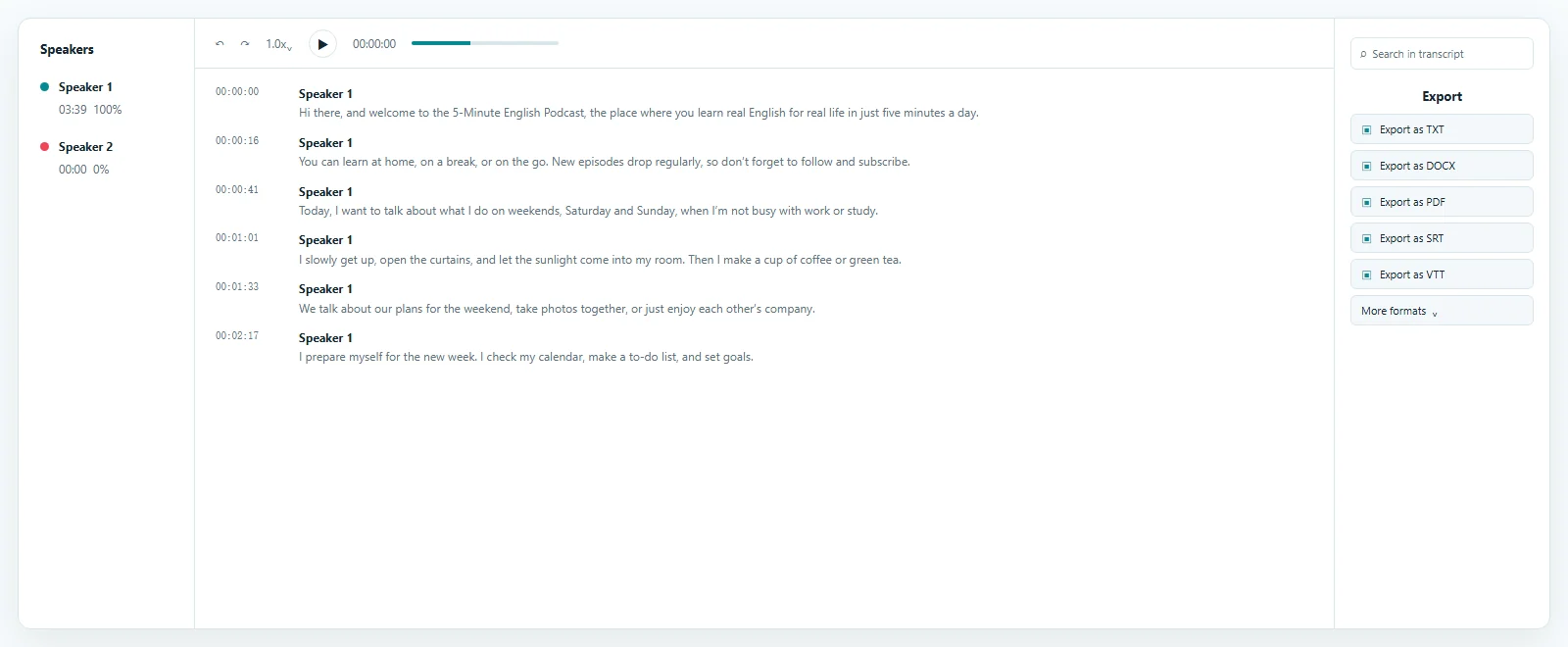
Switch between the transcript, concise summary, meeting notes, automatic chapters, and action items. Every view stays connected to the recording you uploaded.
Focused online transcription for audio files
MP3 recordings are easy to share but slow to scan for one statement or decision. An MP3 to Transcript makes interviews, podcasts, lectures, voice notes, research, and authorized calls searchable while keeping timestamps connected to the source.
For an MP3 to transcription online workflow, upload the recording, choose its language, and start the job. The MP3 to Transcript converter creates time-aligned text for an MP3 to text transcription workflow, with the source and editor in one browser workspace.
An MP3 to transcript is an automated first draft. Clear speech usually produces cleaner wording, while noise, specialist terms, and overlapping voices can require correction. Add important vocabulary before processing and verify names or quotations against playback.
Free accounts can process up to 3 files daily, with the first 20 minutes of each file included. The MP3 to Transcript free allowance requires sign-in but no credit card; paid access supports longer complete recordings. This MP3 to Transcript setup lets you evaluate editing, timing, and exports first.
Find a phrase in the MP3 to Transcript result and return to its timestamp.
Correct wording and speaker labels before sharing or exporting.
Extract spoken content from video files
An MP4 to Transcript makes video speech searchable without scrubbing through the complete timeline. Upload presentations, interviews, tutorials, meetings, lessons, or demonstrations. ToText extracts the spoken track and keeps the video available for visual and verbal context.
Select the file and language. The MP4 to Transcript converter returns editable timing and optional speakers for an MP4 to text transcription workflow. The four-step demonstration shows the path from upload to download.
MP4 to transcript quality depends on the speech track. Clear voices and limited overlap support a stronger draft; quiet microphones, music, or several speakers need closer review. Play uncertain segments from their timestamps while editing.
The MP4 to Transcript free allowance covers up to 3 files daily, with the first 20 minutes of each file included. Paid access supports longer complete files. Moving from an MP4 file to transcript text leaves the original upload unchanged, and dashboard controls can delete the job.
Check wording against playback and visible context.
Preserve timing when an MP4 to Transcript becomes captions.
Reviewable output instead of locked text
ToText keeps transcript segments beside the recording. Select a timestamp, search for a phrase, correct punctuation, and rename speakers. This review loop supports an MP3 to Transcript or MP4 to Transcript without treating automated recognition as final.
Detect the language automatically or select it first. Speaker recognition separates voices, while custom vocabulary provides context for names, acronyms, and technical terms. Noise reduction may help, but clear source audio and human verification remain important.
Use the saved transcript to create a summary, meeting notes, chapters, action items, answers, or an English translation. Each view remains connected to the source for checking.
Jump from a segment to its matching audio or video.
Add names and correct speaker boundaries.
Provide specialist terms, then verify them in context.
Save corrections before creating exports or AI views.
Useful wherever recorded speech becomes work
An MP3 to Transcript is useful when audio carries the complete story; an MP4 to Transcript adds video context when demonstrations, slides, or on-screen events matter. In both cases, process only recordings you own or have permission to use and apply the review standard required by the final task.
Verify quotations, capture decisions, and turn authorized conversations into searchable records.
Use an MP3 to Transcript for show notes, articles, chapters, and reusable source material.
Create notes or caption drafts from an MP4 lesson, tutorial, webinar, or product walkthrough.
Compare responses, locate customer language, and share reviewed findings with authorized teammates.
Move reviewed words into the next workflow
Download an MP3 to Transcript as TXT, DOCX, or PDF. SRT and VTT preserve subtitle cues, while CSV, JSON, ASS, and XLSX support structured workflows. Saved corrections appear in later downloads, so review important wording first.
An MP4 to Transcript supports the same documents, while timed SRT or VTT works well for captions. Keep speakers and timestamps for context, or export clean text for an article, report, archive, or notes.
Create plain text, an editable document, or a fixed reading copy.
Keep time cues for captions and accessibility review.
Move transcript data into structured workflows.
Clear ownership, account, and usage controls
Uploads use encrypted connections, and jobs stay associated with your account unless you create a share link. Dashboard controls delete unneeded work. Upload only media you own or may process, and share transcripts according to the source sensitivity.
Free accounts can process up to 3 files daily, with the first 20 minutes of each file included, without a credit card. Paid access supports longer complete files. Progress and error messages explain when to return from the dashboard or respond to a recording problem.
Explore more formats and outputs
Upload the MP3, choose a language or automatic detection, and start. Review the time-aligned text in the browser, then export the format you need.
Yes. Upload, transcription, editing, and export run through the website in a modern browser.
Upload the video and start an MP4 to Transcript job. The result uses the same editor, timing, speaker options, and exports as MP3.
Quality depends on language, microphone placement, overlap, and clarity. Speaker labels remain editable.
Accuracy varies with recording quality, accents, noise, vocabulary, and overlapping voices. Timestamps and playback support verification.
Export TXT, DOCX, PDF, SRT, VTT, ASS, CSV, JSON, or XLSX with your saved edits.
Upload an MP3 or MP4, receive editable text, and move from recording to a useful document without switching tools.
Published · Reviewed