1
Upload Your WAV File
Choose an authorized .wav recording and upload it directly. WAV to Text starts from the source file, so you do not need to make an MP3 or another compressed copy first.
Drop audio or video here
or browse your files
Transcribe WAV audio into editable text with timestamps, speaker labels, and flexible exports.
3 free transcriptionsNo sign-up requiredNo credit card required
Five steps from WAV audio to reusable writing
Choose an authorized .wav recording and upload it directly. WAV to Text starts from the source file, so you do not need to make an MP3 or another compressed copy first.
Drop audio or video here
or browse your files
Select the spoken language or keep automatic detection enabled. Turn on speaker recognition when multiple voices matter, and leave Transcript selected as the primary WAV to Text result.
Begin processing to convert speech into readable, time-aligned segments. WAV to Text prepares an editable first draft and preserves source timing for faster review.
Speech is becoming time-aligned text.
Read the WAV to Text draft beside playback. Check names, dates, numbers, quotations, specialist vocabulary, punctuation, and speaker labels at the relevant timestamps.
Download WAV to Text as TXT, DOCX, PDF, SRT, VTT, CSV, or JSON. Saved corrections remain available when you need another supported export later.
Read, search, and verify the draft
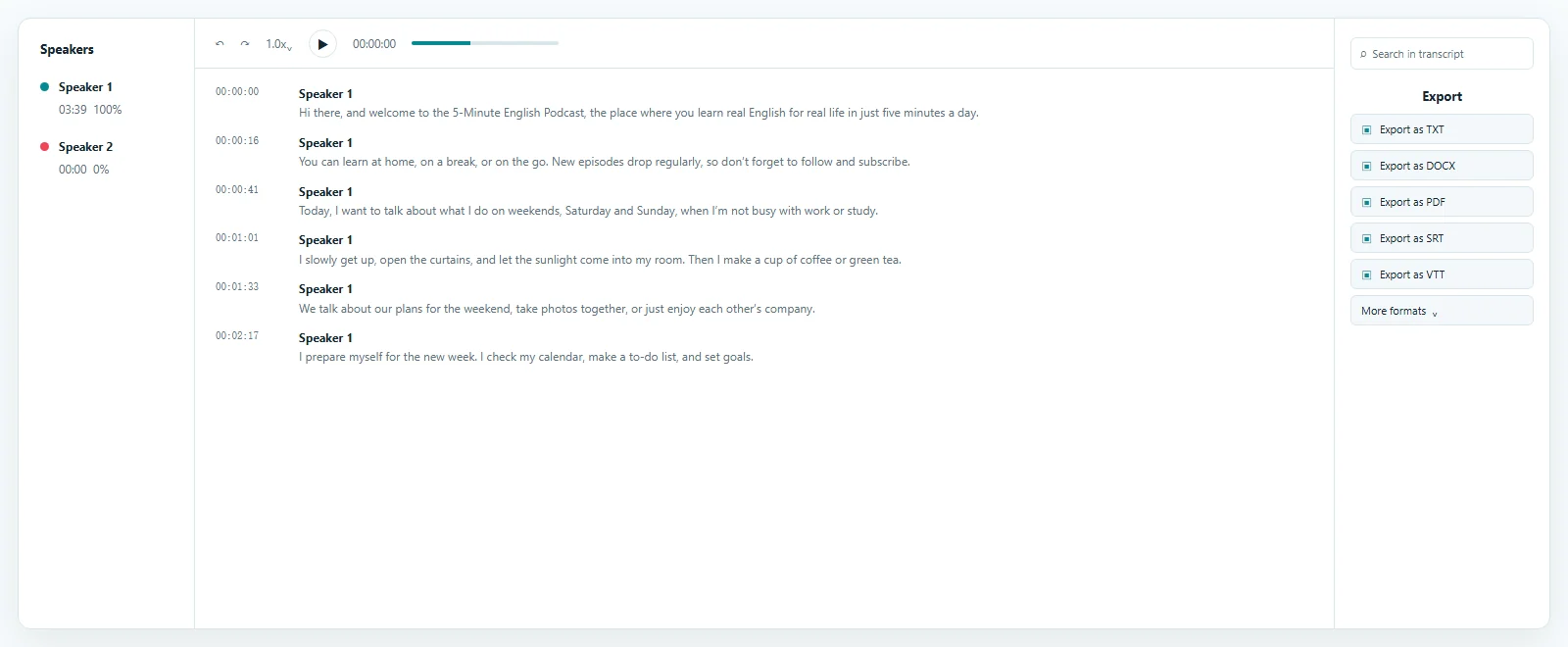
The WAV to Text preview places timestamped transcript segments beside source playback. Transcript opens by default, making it easy to search for a phrase, open the matching moment, correct important wording, and review speaker labels. Other workspace views can then turn the same approved transcript into summaries, notes, chapters, translations, and action items.
Keep the best available source connected
WAV to Text accepts supported WAV recordings directly.
A preliminary format conversion creates another file but does not add spoken information. Uploading the original keeps that source available when an uncertain word must be checked, and it avoids introducing unnecessary changes before transcription.
WAV files often come from field recorders, studio exports, interviews, meetings, research sessions, phone systems, voiceovers, and archival collections. Whether the audio is a short note or a long conversation, WAV to Text makes the speech searchable and editable.
WAV to Text keeps timestamps connected to playback. Search the written draft, open the source moment, and confirm context without scanning the recording from the beginning.
Upload the supported WAV directly instead of preparing a smaller audio copy only for transcription. The uploader remains the source of truth for current file acceptance.
Context for when, who, and what was said
WAV to Text provides an editable transcript with timing and optional speaker context.
Automatic transcription prepares the first draft, while source-linked playback keeps the reviewer in control of final wording. Clear speech and useful microphone placement generally help, but important names, numbers, quotations, acronyms, and technical terms should still be verified.
Each WAV to Text segment links to its place in the recording. Jump directly to a quotation, decision, topic change, or unclear phrase instead of replaying the entire source.
Speaker recognition can distinguish voices in interviews, meetings, and research sessions. Review WAV to Text labels because overlap, similar voices, and background noise can affect assignments.
Correct punctuation, spelling, names, specialist vocabulary, and labels while the recording remains close at hand. The saved WAV to Text version becomes the basis for every later download.
One reviewed source for several deliverables
A reviewed WAV to Text result can become a document, subtitle file, structured dataset, or source for follow-up content.
Choose the format required by the next task without transcribing the same recording again. Corrections saved in the workspace carry into later downloads, keeping the transcript as a reusable layer between the audio and each deliverable.
Export WAV to Text as lightweight TXT, editable DOCX, or a fixed PDF copy for reading, sharing, and archiving. Each document uses the same reviewed transcript.
Choose SRT or VTT when an authorized downstream workflow needs timed cues. These are separate subtitle files and do not permanently place text into video pixels.
Use structured WAV to Text exports when segments, timestamps, or speaker information need to move into research, documentation, development, or archival systems.
Continue from the reviewed transcript to create summaries, notes, chapters, translations, and action items without uploading and processing the WAV again.
Make detailed recordings easier to navigate
WAV to Text is useful whenever spoken information in a WAV recording needs to become searchable, editable, or reusable.
Uncompressed or lightly processed recordings are common in professional, academic, creative, and archival work. A transcript makes specific passages easier to find while retaining the original audio for verification.
Transcribe WAV interviews, oral histories, and research sessions, then verify quotations at their timestamps before adding them to notes, reports, or authorized publications.
Use WAV to Text to find decisions, tasks, names, and dates. Editable speaker labels help preserve conversational context for minutes and follow-up work.
Search long-form speech, extract useful passages, and prepare documents or timed text from the same reviewed WAV to Text transcript.
Create a searchable text layer for authorized production masters or archives while keeping the source recording connected for human verification and later reuse.
Two common names for the same practical task
WAV to Text and WAV to Transcript both describe turning speech in a WAV file into editable writing.
Text emphasizes the output, while transcript emphasizes the spoken-source record. In both cases, ToText uploads the same WAV, creates timestamped segments, lets you review them against playback, and exports the corrected result.
Use TXT, DOCX, or PDF when the WAV to Text result is mainly for reading, quotation, notes, sharing, or long-term documentation.
Use SRT or VTT for compatible subtitle workflows, or CSV and JSON when timing and speaker fields need to remain available to another system.
Answers before you upload
Yes. ToText allows up to 3 free files per day and transcribes the first 20 minutes of each file without a credit card, so you can test WAV to Text first.
To transcribe WAV to text, upload a supported recording, select or detect the language, review the timestamped draft against playback, and export the corrected writing in the format you need.
No. WAV to Text accepts supported WAV audio directly, so an MP3 copy is unnecessary before transcription.
Speaker recognition can distinguish voices in many multi-person recordings. Review and rename the automatic labels because similar voices, overlap, and noise can affect assignments.
Yes. Transcript segments, punctuation, timestamps, and speaker labels remain editable, letting you correct important details before export.
Export WAV to Text as TXT, DOCX, PDF, SRT, VTT, CSV, JSON, ASS, or XLSX according to the next compatible workflow.
Accuracy depends on speech clarity, microphone placement, accents, noise, vocabulary, and overlapping voices. Verify names, numbers, and quotations against source playback.
Yes. Review the WAV to Text wording and timing, then export a separate SRT or VTT file for a compatible destination. The export does not alter a video.
Explore more formats and outputs
Turn Your WAV Recording into Editable Text
Convert WAV to text by uploading the original recording, reviewing the timestamped transcript against playback, and exporting the result for your next task.
Published · Reviewed