1
Upload the MP4 video
Drop an authorized MP4 video into ToText or browse your device.
Drop audio or video here
or browse your files
Convert MP4 video into accurate, editable text online. Get fast MP4 to text transcription with timestamps, speaker labels, and TXT, DOCX, SRT, or VTT export.
3 free transcriptionsNo sign-up requiredNo credit card required
Four steps from spoken video to editable words
Drop an authorized MP4 video into ToText or browse your device.
Drop audio or video here
or browse your files
Select automatic detection or the spoken language, then enable speaker recognition or add important vocabulary when useful.
Transcribe MP4 to text, replay uncertain segments, and correct names, numbers, or other important wording.
Save your edits, then choose a document, caption, or structured data export.
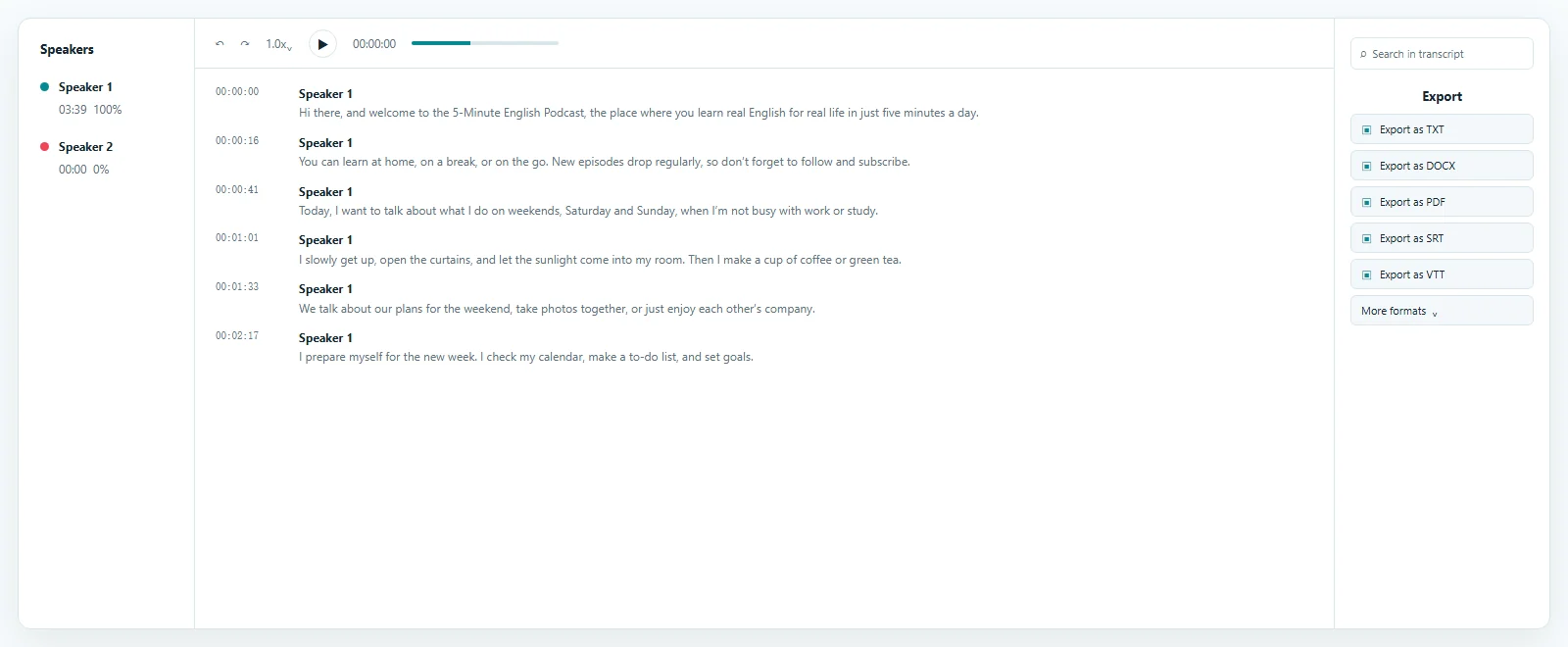
Review the transcript beside your source video
MP4 to text transcription creates an editable draft aligned with playback. Accuracy depends on the recording.
Keep spoken content connected to the recording
Yes—timestamps keep an MP4 transcript connected to playback.
Select a segment and confirm a detail in its matching video moment.
Speaker recognition organizes conversation turns. Review labels affected by overlap, similar voices, or noise, and keep MP4 to text transcription traceable to its video.
Jump from text to the matching video moment.
Separate turns and rename detected speakers after review.
Guide MP4 speech to text toward important terms.
Turn an automated draft into dependable text
An MP4 transcript remains editable after automated transcription.
Replay the source and check names, measurements, dates, prices, quotations, and decisions before sharing.
Search the MP4 video to text result, copy approved passages, or prepare summaries and action items. Corrections remain available for export.
Keep the original video available during review so quotations, names, numbers, and speaker changes can be verified before export.
Edit words and punctuation beside playback.
Find a name, question, promise, or task.
Create notes, summaries, captions, documentation, or internal records.
Written access for common video recordings
MP4 to text conversion makes speech searchable for review, quotation, documentation, and accessibility while preserving the source video.
Convert MP4 to text and verify quotations before analysis.
Capture decisions and actions from recorded sessions.
Turn spoken instructions into steps and documentation.
Reuse MP4 audio to text as captions, articles, or descriptions.
Choose a document or timed-text output
You can export MP4 speech as documents, captions, or structured data after review.
Download TXT for plain text or DOCX or PDF for documents. Each MP4 to text export uses the latest saved corrections.
SRT and VTT preserve timing as separate files rather than rendering words into video. The MP4 to SRT page focuses on subtitles; this page provides editable transcript outputs.
Use reviewed text for documents, sharing, or archiving.
Keep reviewed speech and timestamps for compatible tools.
Save corrections and download a revised file without retranscribing.
Try the workflow before processing longer files
To transcribe MP4 to text free, use a private account workspace with stated daily limits.
Free access covers up to 3 files daily, with the first 20 minutes of each file included, without a credit card; paid access supports longer complete recordings.
Process only authorized video. ToText does not publish recordings or transcripts as public pages. Review sensitive content before sharing and follow applicable rules.
The free MP4 to text converter uses an MP4 to text converter free plan.
Keep video, editable text, and exports in your workspace.
Upload up to 20 hours when account access supports the duration.
Answers before you upload
It recognizes MP4 speech and creates editable, time-aligned text for review and export.
Upload a video, choose language and settings, generate a draft, review it, and export.
Yes. Free accounts can process up to 3 files daily, with the first 20 minutes of each file included, without a card.
Accuracy depends on clarity, language, noise, terminology, and overlap. Verify important details with playback.
Yes. Enable recognition, then review and rename automatically detected labels.
Yes. Correct text, rename speakers, review timing, save, and export.
Exports include TXT, DOCX, PDF, SRT, VTT, and structured formats.
No. It transcribes spoken audio rather than extracting on-screen words or editing video.
Explore more formats and outputs
Upload a video, create an editable transcript with timing, and finish MP4 to text with the export you need.
Published · Reviewed