1
Upload the MP4 video
Drop an authorized video into the MP4 to SRT tool and keep the source available for review.
Drop audio or video here
or browse your files
Convert MP4 to SRT online with accurate timestamps. Upload an MP4 video, generate editable subtitles, and download a ready-to-use SRT file.
3 free transcriptionsNo sign-up requiredNo credit card required
Four steps from video speech to timed captions
Drop an authorized video into the MP4 to SRT tool and keep the source available for review.
Drop audio or video here
or browse your files
Detect or choose the language, then provide useful vocabulary.
The MP4 to SRT converter creates timed text so you can replay each cue and correct its wording or timing.
Finish the MP4 to SRT conversion by saving the reviewed edits and choosing SRT from the export menu.
Review the result before you download
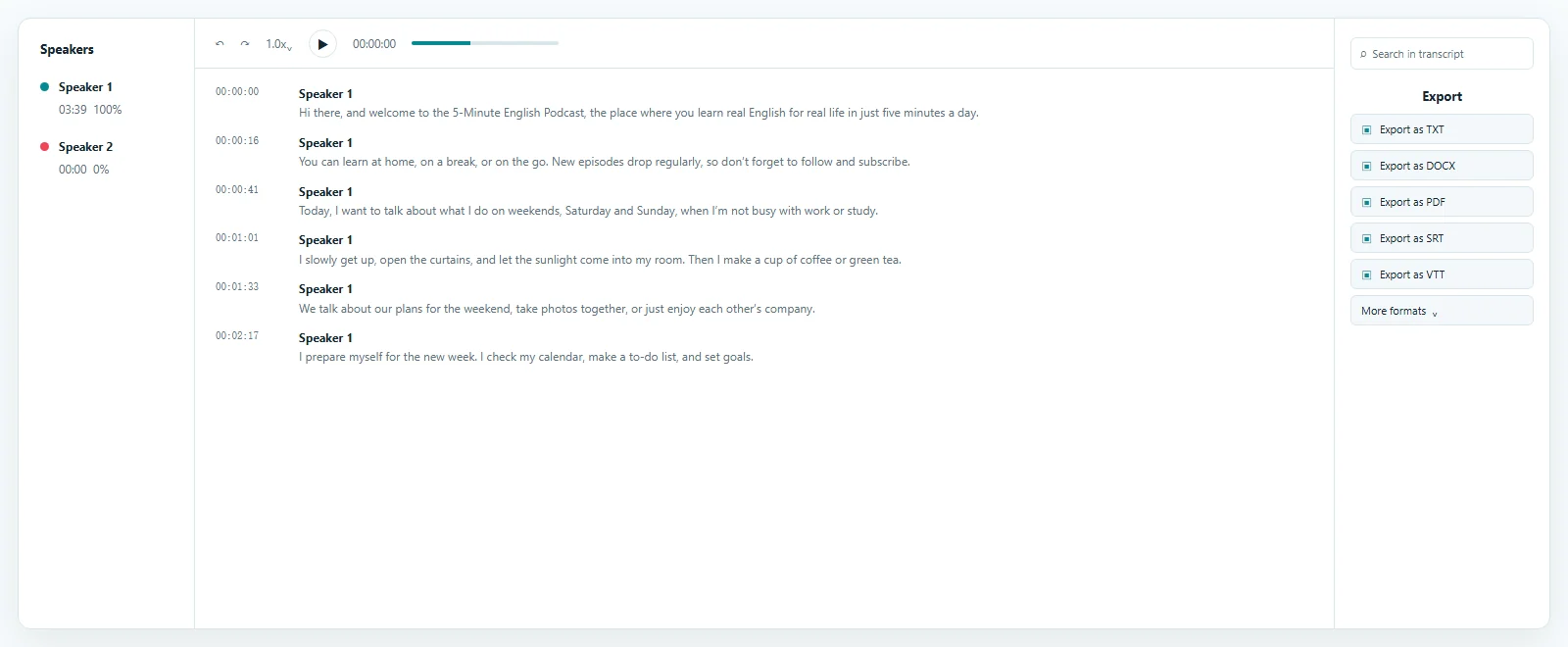
See the time-aligned transcript produced by the MP4 to SRT workflow. Replay each segment, verify spoken wording, and prepare subtitle cues before exporting the final file.
Keep every cue readable and synchronized
Every MP4 to SRT result is an automated draft. Noise, distant microphones, specialist terms, and overlapping speech require review against the source.
Replay a timed segment, correct it, and save the cue. The MP4 to SRT editor keeps playback and text together for checking names, numbers, and quotations.
Timestamps control when text appears. Check cues that start late, stay too long, or cross a natural pause without changing the video.
Read each cue at normal playback speed and confirm that line breaks preserve meaning. Short, complete phrases are easier to scan, while consistent timing helps reviewers follow a conversation without losing the current speaker.
Jump from a cue to the matching MP4 moment.
Correct wording before the MP4 to SRT download.
Check start and end times so captions follow the pace of the speech.
Export the latest saved text and timing instead of the first draft.
A portable subtitle file for the next step
An MP4 to SRT file contains numbered cues, timestamps, and text. This separate plain-text asset can be imported where captions are needed.
Saved corrections appear in each MP4 to SRT export. If a destination reveals an issue, revise the cue and export again.
Try MP4 to SRT free for up to 3 files daily, with the first 20 minutes of each file included. Paid access supports longer complete files, and results remain editable.
Receive sequential cues with readable timestamps and the latest saved text.
Keep the MP4 to SRT file separate for use in compatible destinations.
Correct a cue, save, and download a revised SRT without processing again.
Take finished captions into publishing workflows
After MP4 to SRT conversion, import the subtitle file into a compatible workflow. YouTube accepts timed captions for videos you manage, and many editors accept SRT tracks. Follow the destination's steps and preview the video before publishing.
Keep video and subtitle versions together. Trimming the MP4 after captions are created can shift later cues. Generate from the final cut when possible, or revise timings after structural edits.
ToText creates a separate subtitle asset; it does not render captions into the picture or create a new video. This MP4 to SRT online workflow ends with an editable file you control.
Because SRT remains separate, the destination controls styling. Preview line breaks, reading pace, character display, and synchronization after import, especially when the final video differs from the uploaded source. Always review the finished playback before publishing it.
Upload the reviewed SRT to your video, then preview it before publishing.
Import cues into an SRT-compatible editor and check the final timeline.
Use MP4 to SRT subtitles to make authorized recordings easier to follow.
Answers before you upload
MP4 to SRT conversion turns spoken MP4 audio into timed cues and a separate editable subtitle file.
Yes. MP4 to SRT free access processes up to 3 files daily after sign-in, with the first 20 minutes of each file included and no credit card required.
Accuracy depends on clarity, language, accents, noise, vocabulary, and overlap. Playback helps verify important cues.
Yes. Replay time-aligned segments, correct the text, confirm cue timing, save, and export SRT.
No. It creates a separate subtitle file from the speech for import into a compatible destination.
Yes. Upload the reviewed MP4 to SRT file for a video you manage and preview it before publishing.
Explore more formats and outputs
Upload an authorized MP4 video, generate editable subtitle cues, verify the timing, and finish the MP4 to SRT workflow with a portable SRT file.
Published · Reviewed