1
Upload Your MP3 File
Choose an authorized MP3 recording and upload it directly. MP3 to SRT starts from the audio file you already have, without requiring a blank video or a different audio format.
Drop audio or video here
or browse your files
Create an SRT subtitle file from MP3 audio with timestamps, speaker labels, and editable text.
3 free transcriptionsNo sign-up requiredNo credit card required
Five steps from MP3 audio to timed subtitles
Choose an authorized MP3 recording and upload it directly. MP3 to SRT starts from the audio file you already have, without requiring a blank video or a different audio format.
Drop audio or video here
or browse your files
Select the spoken language or keep automatic detection enabled. Choose speaker recognition when multiple voices matter, then keep Transcript selected as the primary MP3 to SRT workspace.
Begin processing to turn speech into time-aligned segments. MP3 to SRT creates an editable first draft while retaining the timing needed for a standard subtitle file.
Speech is becoming time-aligned text.
Read each MP3 to SRT segment beside playback. Correct names, punctuation, numbers, specialist terms, speaker labels, and awkward cue breaks before preparing the final download.
Open Export and select SRT. The downloaded MP3 to SRT file contains numbered cues, start and end timestamps, and the latest text saved during review.
Check every cue against the recording
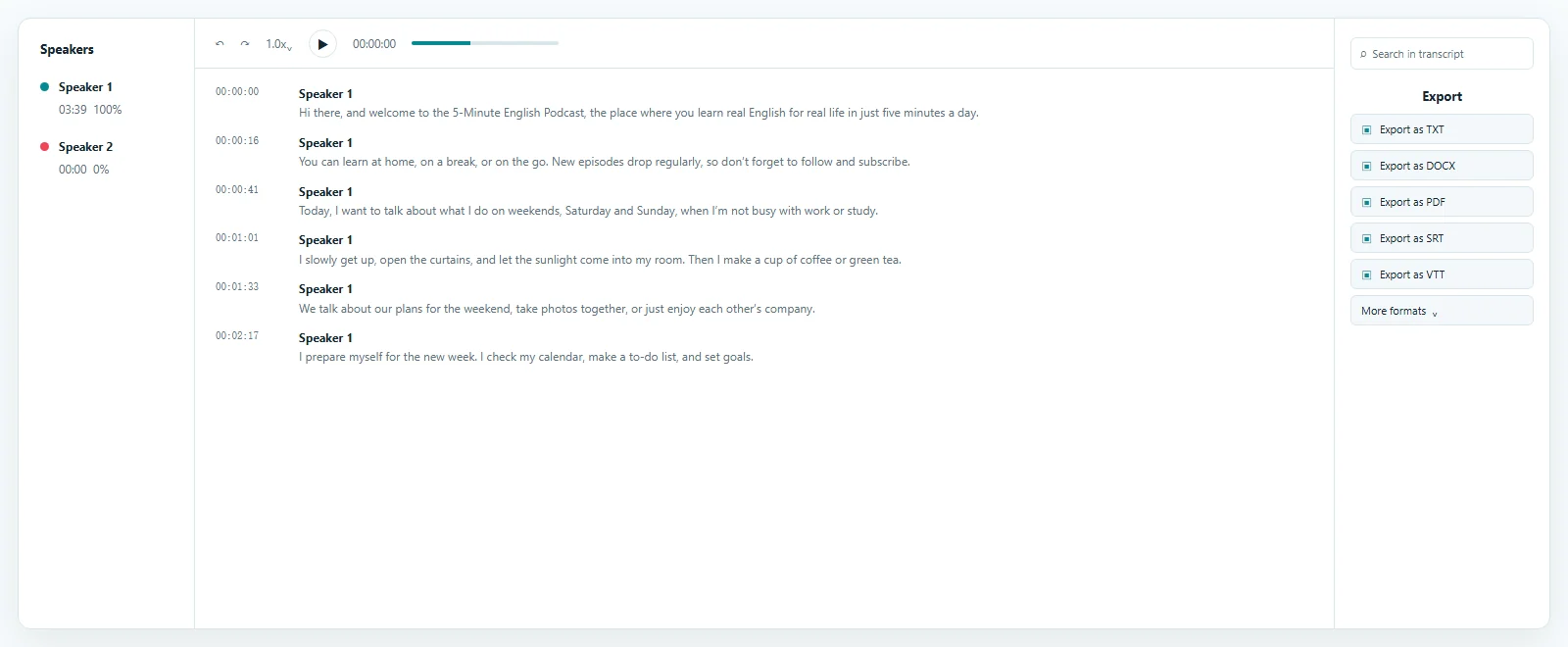
The MP3 to SRT preview keeps the transcript, timestamps, speaker labels, and source playback in one review space. Transcript opens by default, so you can search the draft, open the matching audio, correct important wording, and confirm cue timing before downloading the separate subtitle file.
Standard cues for compatible destinations
MP3 to SRT turns spoken audio into a separate file of timed subtitle cues.
Every SRT cue contains a sequence number, a start time, an end time, and the words assigned to that interval. This simple structure lets compatible players, editors, course systems, and publishing tools follow the recording without placing text permanently into video pixels.
The MP3 to SRT result remains independent from the audio. You can correct the wording, replace the file, translate approved cues, or use it with another authorized media version. Fonts, colors, positioning, animation, and display behavior are handled by the destination rather than the subtitle file.
1
00:00:01,200 --> 00:00:04,000
Welcome back. Today we are reviewing the project.

2
00:00:04,300 --> 00:00:07,600
First, let us look at the latest changes.Timestamps connect each MP3 to SRT segment to its source moment. Search the text, open the relevant cue, and listen again instead of replaying the whole recording.
MP3 to SRT exports numbered blocks with comma-based milliseconds and a blank line between cues. This widely used structure keeps the file readable and portable.
This workflow recognizes speech in MP3 audio and prepares text cues. It does not synthesize audio, produce a video, or permanently place captions over visual content.
Human review for names, voices, and timing
MP3 to SRT keeps the automatic draft editable before download.
Recording quality affects the starting transcript. Clear voices, useful microphone placement, limited background noise, and less overlap generally make review faster, while proper names, dates, figures, quotations, accents, and specialist vocabulary still deserve a source-linked check.
Open the MP3 to SRT timestamp for any uncertain line, compare it with playback, and change only the affected text. Saved corrections carry into later exports.
Speaker recognition can separate interviews, meetings, podcasts, and discussions. Rename MP3 to SRT labels when needed and decide whether identifiers belong in the final subtitle wording.
Listen around pauses and speaker changes, then review long or abrupt segments. MP3 to SRT provides a timed foundation, but the final reading experience benefits from editorial judgment.
Reusable timed text for audio-first projects
MP3 to SRT is useful when narration or recorded speech exists before the final visual workflow.
The independent file can move into a compatible destination after the text has been checked against the original audio. If later editing changes the media timeline, review synchronization again before publishing.
Prepare an MP3 to SRT file for an authorized podcast video, interview clip, or searchable archive. The reviewed transcript can also support quotations, show notes, and chapters.
Create timing from lecture audio, lessons, or narration, then use the MP3 to SRT cues in a compatible course or media workflow after the visual edit is stable.
Search a timestamped conversation, verify speakers and quotations, and export MP3 to SRT when a selected segment needs a timed-text deliverable.
Use reviewed timed text in destinations that accept SRT. The receiving platform controls compatibility, display, styling, and any final accessibility requirements.
A format-specific path within a broader audio workflow
MP3 to SRT is the focused choice when the source file is an MP3 recording.
The broader Audio to SRT workflow accepts several supported audio formats, while this page explains the same timed-subtitle task specifically for MP3. Both keep the transcript editable, connect segments to playback, and export a separate SRT file.
Choose VTT only when a compatible web workflow requests that timed-text format. TXT, DOCX, PDF, CSV, JSON, ASS, and XLSX are secondary exports for documentation, analysis, or reuse rather than the primary MP3 to SRT result.
Upload the MP3 directly and preserve it as the review source. No preliminary audio conversion is needed to generate SRT from MP3 speech.
Choose the general audio workflow for supported M4A, WAV, OGG, AAC, FLAC, or Opus recordings while retaining the same review-and-export process.
Answers before you upload
Yes. ToText allows up to 3 free files per day and transcribes the first 20 minutes of each file without a credit card, so you can test MP3 to SRT online first.
Upload the MP3, choose language and speaker settings, start transcription, review the timed text against playback, and download the corrected result as a separate SRT file.
Yes. MP3 to SRT keeps transcript segments, timestamps, and speaker labels editable so you can correct the draft before export.
Speaker recognition can distinguish voices in many multi-person recordings. Review and rename the automatic labels before including speaker information in the final subtitles.
Yes. MP3 to SRT starts from audio and produces a separate subtitle file. A video is not required for transcription or SRT download.
An SRT file contains numbered cues, start and end timestamps, and subtitle text. It does not contain the original MP3 or control final caption styling.
Accuracy depends on speech clarity, microphones, accents, background noise, vocabulary, and overlapping voices. Verify important names, numbers, and quotations against the source.
Yes. SRT is primary here, while VTT, TXT, DOCX, PDF, CSV, JSON, ASS, and XLSX are available for compatible secondary workflows.
Explore more formats and outputs
Create SRT Subtitles from Your MP3
Convert MP3 to SRT by uploading your recording, reviewing the timestamped transcript against playback, and downloading a clean, separate subtitle file.
Published · Reviewed